Usability Testing Services vs Running Sessions Yourself
Teams reach for usability testing services at one of two moments: when nobody internally has ever run a session, or when the sessions they have been running are not changing anyone’s mind. Those need different answers. The first is a skills problem you can solve in a fortnight. The second is usually a sampling and evidence problem that hiring an agency will not fix by itself. This page covers how to plan and run sessions properly, what an agency adds that you cannot easily replicate, and the sample-size question that decides whether your findings hold up in the room.
What usability testing actually tests
Usability testing means watching a representative person attempt a real task with your product, without help, and recording where they hesitate, backtrack or fail. That is the whole method. Everything else is logistics.
It is not:
- A focus group. Asking a group what they think of a design produces opinion. Watching one person fail to find the checkout produces evidence. The two get confused constantly, and the confusion is why so many research reports read as preference polling.
- A survey. Self-reported difficulty correlates poorly with observed difficulty. People forget the friction they got past.
- A/B testing. A test tells you which variant wins on a metric. Usability testing tells you why people behave the way they do. They answer different questions, and if you already know what to build, an A/B test is the cheaper way to confirm it.
- An expert review. A UX audit run by an experienced practitioner finds real problems fast and costs a fraction of a study. It also encodes that practitioner’s assumptions. Use both; do not substitute one for the other.
The sample-size question, honestly
Almost every page on this subject repeats the five-users rule. It comes from Jakob Nielsen and Thomas Landauer’s model, and Nielsen’s 2000 article Why You Only Need to Test with 5 Users is the reason it is universal. The reasoning is sound: with a typical problem-discovery rate of about 31% per user averaged across many projects, five users surface roughly 85% of the problems in a single homogeneous group, and the sixth onwards mostly repeats what you already saw.
The part that gets dropped is the variance. Laura Faulkner’s 2003 study, Beyond the five-user assumption in Behavior Research Methods, tested 60 users on the same interface and then drew random sets from that pool. Some sets of five found 99% of the problems. Other sets of five found 55%. That is the same method, the same product, the same day, producing either a thorough report or a half-empty one depending on who happened to walk in.
Increasing the sample raised the floor rather than the ceiling. With 10 participants, the worst-performing set still found 80% of the problems. With 20, the worst set found 95%.
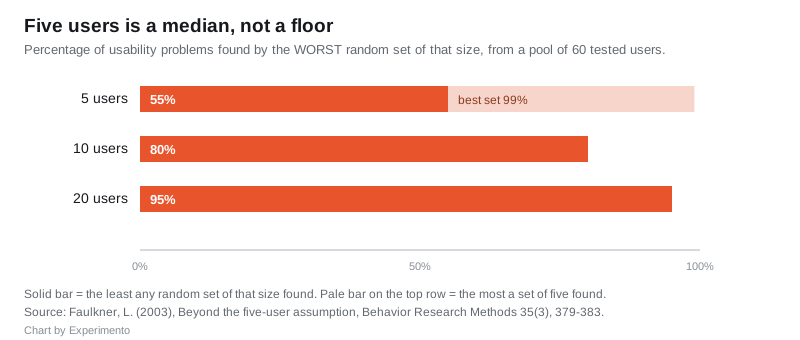
Read together, both findings are true and neither is the headline people take away:
| Your goal | Participants | What you get |
|---|---|---|
| Find obvious problems fast, iterate, test again | 5 per distinct user group | Most problems most of the time, with real risk of a thin round |
| Find lower-frequency problems, or make a decision you cannot revisit | 10 to 18 | A much higher floor on coverage |
| Quantitative benchmarking, task success rates, before-and-after comparison | 20 to 40 | Numbers you can put a confidence interval around |
Nielsen’s own recommendation resolves the tension: three studies of five beat one study of fifteen, because you redesign between rounds and the second round finds problems the first could not have exposed. That only works if you genuinely redesign between rounds. Running three rounds of five on an unchanged interface gets you the risks of small samples three times over.
The other multiplier nobody costs in: five is per distinct user group. If your product serves administrators and end users, or first-timers and power users, those are separate populations and five each is the starting point, not five in total.
Running sessions yourself: the sequence that works
- Write the tasks before you recruit. A task is a goal in the participant’s language with a definable end state: “you have decided to cancel your subscription, do that”. Not “have a look at the settings page”. If you cannot say what finishing looks like, it is not a task.
- Recruit against behaviour, not demographics. The screener question that matters is what someone has actually done recently, not their age bracket. “Have you booked a train ticket online in the last month” beats any persona attribute. Our page on user personas covers where personas do and do not help here.
- Pilot with one person first, internally if you must. Every study has a broken task, a confusing prompt or a prototype dead end, and the pilot is where you find it rather than burning a real participant.
- Say almost nothing during the session. The single hardest discipline. When someone gets stuck, silence for ten seconds. If you must speak, “what are you trying to do?” and “what did you expect to happen?” are the only two questions you need. Never “did you see the button at the top?”
- Record the screen and the audio, and take timestamped notes live. Reviewing recordings end to end is where research time disappears. A note with a timestamp lets you cut the 40-second clip that ends the argument.
- Analyse against a fixed list. After each session, log every problem with the task it occurred on and its severity. At the end, count how many participants hit each problem. The count is what turns “someone got confused” into a priority.
- Deliver clips, not a deck. A 30-second video of a real customer failing the signup form moves a roadmap. A slide saying “users found signup confusing” does not.
Moderated remote sessions over a video call are the default for most teams and cost close to nothing beyond the incentive. Unmoderated remote testing, where participants complete tasks alone against recorded prompts, gets you more participants faster and is genuinely useful for pre-launch validation, but you cannot ask why, so you get the what without the cause. Run unmoderated when you already know which question you are answering.
What a usability testing service adds
Agencies and specialist platforms sell three things that are hard to build in-house, and one that is easy to overpay for.
Genuinely hard to replicate:
- Recruitment of difficult populations. Cardiac nurses, procurement managers at firms above a certain size, people who have made a claim in the last six months. Panel access and screening are most of what you are paying for on a B2B study, and it is the reason in-house programmes stall.
- Accessibility and assistive technology testing. Watching a screen reader user attempt your flow needs participants who use one daily and a moderator who understands the software. This is where lab-based testing earns its cost, and it is the part in-house teams almost always skip.
- Independence when the finding is political. If the answer is that a senior stakeholder’s favourite feature does not work, the same evidence lands differently from an outside party. That is not a research argument; it is an organisational one, and it is often the real reason an agency gets hired.
Easy to overpay for:
- Moderation of straightforward consumer tasks. If your users are ordinary members of the public and your task is buying something, an agency is running the same session you could run, with better note-taking. Buy the recruitment and moderate it yourself if budget is tight.
Pricing models vary more than headline rates suggest. Specialist providers typically quote hourly for consultancy, per-project for a defined sprint, or per-participant on a platform with a panel attached. The variable that moves the number most is not the number of sessions but how hard the participants are to find. Ask for the recruitment cost broken out separately before comparing quotes, because two proposals with the same total can differ tenfold in what they spend on finding the right people. Our comparison of a UX research agency versus an in-house team works through the longer-term version of this decision.
The failure modes worth knowing
- Testing the prototype the team already agreed on. If there is only one design and it ships either way, you are collecting reassurance. Bring two options or test early enough that the answer can change something.
- Leading tasks. “Use the filter to narrow the results” tells the participant the filter exists and that it is the right tool. The task should describe the goal and let them find the route.
- Ignoring the participant who fails fastest. The instinct is to treat them as unrepresentative. They are usually the closest thing you have to a first-time user with no context, which is exactly who you cannot see any other way.
- Reporting problems without frequency or severity. A list of 34 issues with no ordering gets filed. Five issues ranked by how many participants hit them and what it cost them gets fixed.
- One round, never repeated. Usability testing pays off as a habit. A single study before launch finds problems at the point they are most expensive to fix.
If you are building the wider research practice rather than running one study, our overview of what user research is and the CRO research methods page cover how usability testing sits alongside analytics, session replay and experimentation.
Frequently asked questions
How many participants do I need for usability testing? Five per distinct user group for iterative discovery, 10 to 18 if you need to catch lower-frequency problems or cannot easily run another round, and 20 to 40 for quantitative benchmarking. Five is a median expectation rather than a guarantee: in Faulkner’s 2003 study some sets of five found 99% of problems and others found 55%.
Is it worth paying for usability testing services or should we do it in-house? Pay for what is hard to replicate: recruiting specialist or hard-to-reach participants, accessibility testing with real assistive technology users, and independence when the finding is politically awkward. Moderating ordinary consumer tasks is something most teams can learn to do well in a few sessions.
What is the difference between moderated and unmoderated usability testing? In a moderated session a researcher is present and can ask why someone did what they did. Unmoderated testing has participants complete recorded tasks alone, which is faster and cheaper at higher volumes but gives you behaviour without explanation. Use moderated when you are still working out what the problem is.
How long should a usability testing session be? Between 45 and 60 minutes for a moderated session, covering three to five tasks. Beyond an hour, fatigue starts producing behaviour that reflects the session rather than the product. Unmoderated tests should be shorter still, usually 15 to 20 minutes.
Can you run usability testing on a prototype or does it need working software? A clickable prototype works well and is where testing is most valuable, because changes are still cheap. Be explicit with participants about what is not built, and design the tasks to stay inside the paths the prototype supports so a dead end does not read as a usability failure.
How do we decide which problems to fix first? Rank by how many participants hit the problem and what it cost them when they did. A problem that four of six people hit and that stopped them completing the task outranks a cosmetic issue that everyone noticed and nobody was blocked by. Frequency and severity together, not a flat list.
More from Experimento
related resultsBest A/B Testing Tools in 2026, Compared by What They Actually Do
A practical 2026 comparison of the best A/B testing tools by what each one is actually good at, from Optimizely and VWO to GrowthBook and PostHog.
read result →A/B Testing Tools Compared: Which Platform Fits Your Team
A/B testing tools compared for 2026: VWO, Optimizely, AB Tasty, Convert, GrowthBook, Statsig and PostHog, matched to marketing, CRO and engineering teams.
read result →Data-Driven Design: Let Research Guide Your Product Decisions
A practical guide to data-driven design: how to pair analytics with user research, run honest tests, and make product decisions on evidence, not opinion.
read result →